目錄
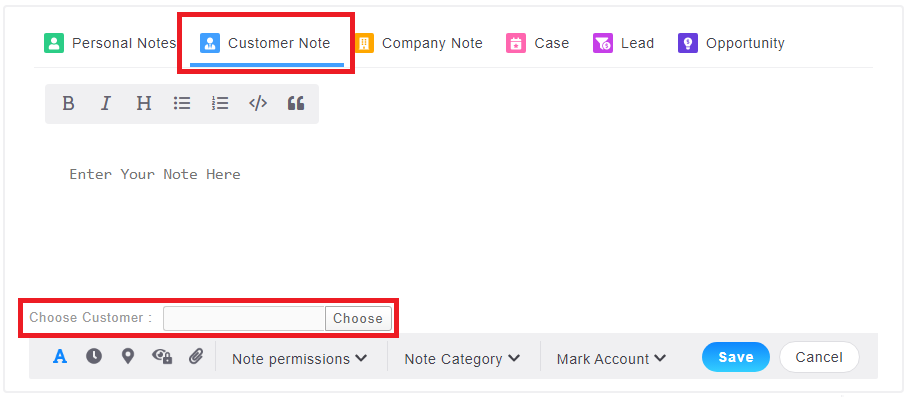
If there are a batch of customers with the same notes, besides importing notes, users can also add notes in batches through the Customer Notes on the home page.
1. Enter the note content in the [Customer Note] on the homepage, then select the customers.
2. The system will pop up a window for selecting customers, where you can select customers based on recent browsing history, tags, my conditions, name/contact person, or company name.
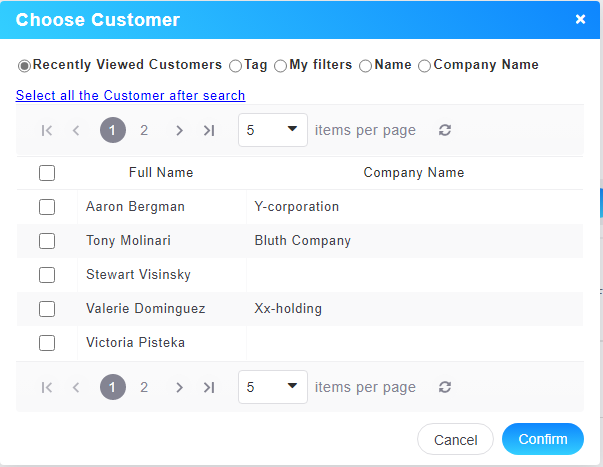
*Note: If you select hundreds or thousands of customers at a time, there will be a number of the same notes on your home page.
來源連結:
https://support.vitalyun.com/en/?catid=28&id=5105%3Ahow-do-i-add-notes-in-batches&view=article
More Content
2024 August
How to change the System Representative email account?
2024 August